CT970-48 LANforge ICE 48-port WAN Emulator
The CT970-48 is an excellent choice for high-density
WAN emulation. The CT970-48 is a set of 2 machines: One LANforge machine
to do the WAN emulation and bridging, and an off-the-shelf managed ethernet
switch supporting 802.1Q VLANs.
The LANforge machine is a 1U rackmount and the 48-port ethernet switch is
a 2U rackmount unit. The user's stations plug into the ethernet switch
and speak regular ethernet (no 802.1Q VLAN support is required in the
devices-under-test.) The WAN emulation, bridging, and optional virtual router
configuration is all managed through the LANforge-GUI.
This same general configuration can support 24, 96 and other
amounts of WAN emulations: Contact your sales representative for pricing
and configuration details.

Larger Images: front
back
NOTE: This product may have a different hardware
configuration than the system pictured above.
Refer to your official quote for details. |


NOTE: This product may have a different hardware
configuration than the system pictured above.
Refer to your official quote for details. |

Candela Technologies Inc., 2417 Main Street, Suite 201, P.O. Box 3285,
Ferndale, WA 98248, USA
www.candelatech.com | sales@candelatech.com | +1 360 380 1618
Example Network Diagram

Candela Technologies Inc., 2417 Main Street, Suite 201, P.O. Box 3285,
Ferndale, WA 98248, USA
www.candelatech.com | sales@candelatech.com | +1 360 380 1618
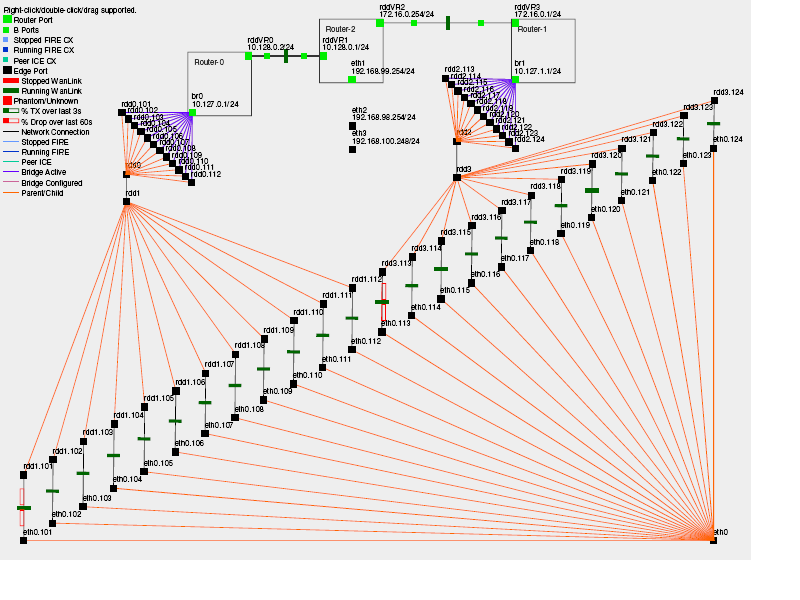
LANforge Netsmith Diagram for CT970 Configuration with Routing
Candela Technologies Inc., 2417 Main Street, Suite 201, P.O. Box 3285,
Ferndale, WA 98248, USA
www.candelatech.com | sales@candelatech.com | +1 360 380 1618
Quick Start Guide
- Connect Management ethernet port on the LANforge machine to Management network or management PC. If
connecting directly to a PC, an ethernet cross-over cable should be used.
Or, connect VGA, Keyboard, and Mouse to the chassis and manage it locally.
- Connect 802.1Q VLAN switch's trunk port to eth2 of the LANforge machine. This is
the VLAN trunk between the LANforge machine and the VLAN switch.
- Connect port eth3 of the LANforge machine to your network switch or router leading towards
the internet or network core.
- Connect Clients to the ports on the 802.1Q VLAN switch. Each port on the switch is
configured to bridge regular un-tagged ethernet frames to one of the VLANs on the
trunk port leading to the LANforge machine.
- Connect power to the units and turn them on. The order in which they are booted
does not matter.
- If managing remotely, install the LANforge-GUI on a separate management PC or Laptop. Windows and
Linux GUIs are supported: Select the correct one from the CDROM or Candela
Technologies Download page and install it.
- The CT970-48 should now boot. If DHCP is enabled on the Management network,
the CT970-48 LANforge machine will automatically acquire an IP address. If DHCP is not available,
the IP address will be set to 192.168.1.101 by the LANforge start scripts.
- Start the LANforge-GUI on the management PC, or the CT970-48 LANforge server if managing
locally, and click the 'Discover' button.
It should find the CT970-48 LANforge appliance and add the IP address to the drop-down
box in the Connect widget. Press 'Connect' and you will be connected to
the CT970-48.
- Select the WanLinks tab in the GUI. One or more of the pre-configured tests should
already be running. You may double-click the row in the top section to modify
the configuration. You can also view a real-time report of the test with the
'Display' button. Any modifications take place immediately after you click
'Submit'.
- For a global view of the system and Virtual Routing features, click the
Netsmith button on the Status panel or Resource panel.
Candela Technologies Inc., 2417 Main Street, Suite 201, P.O. Box 3285,
Ferndale, WA 98248, USA
www.candelatech.com | sales@candelatech.com | +1 360 380 1618
LANforge-ICE Related Screen Shots
Candela Technologies Inc., 2417 Main Street, Suite 201, P.O. Box 3285,
Ferndale, WA 98248, USA
www.candelatech.com | sales@candelatech.com | +1 360 380 1618
Candela Technologies Inc., 2417 Main Street, Suite 201, P.O. Box 3285,
Ferndale, WA 98248, USA
www.candelatech.com | sales@candelatech.com | +1 360 380 1618
Create/Modify WanLink Window
Candela Technologies Inc., 2417 Main Street, Suite 201, P.O. Box 3285,
Ferndale, WA 98248, USA
www.candelatech.com | sales@candelatech.com | +1 360 380 1618
Software Features
- General purpose WAN and Network impairment emulator.
- Able to simulate 48 independent DS1, DS3, DSL, CableModem, Satellite
links and other rate-limited networks, from 10bps up to 45Mbps (full duplex). Total aggregate throughput
will not exceed 1Gbps.
- Can modify various network attributes including: network-speed, latency, jitter,
packet-loss, packet-reordering, and packet-duplication.
- Supports Packet corruptions, including bit-flips, bit-transposes and byte-overwrites.
- Supports WanPath feature to allow configuration of specific behavior between
different IP subnets, MAC addresses or other packet filters
using a single pair of physical interfaces.
WanPath support may require purchase of additional WanPath licenses, please ask
your sales contact for more information.
- Supports routed and bridged mode for more flexibility in how you configure
your network and LANforge-ICE.
- Supports WAN emulation across virtual 802.1Q VLAN interfaces more efficient use
of limited physical network interfaces.
- Supports 'WAN-Playback' allowing one to capture the characteristics of
a live WAN and later have LANforge-ICE emulate those captured characteristics.
The playback file is in XML format, and can be easily created by hand or with
scripts. The free LANforge-ICEcap tool can be used to probe networks and automatically
create the XML playback file.
- Allows packet sniffing and network protocol decoding with the integrated
Wireshark protocol sniffer.
- Includes comprehensive management information detailing all aspects of the LANforge system
including processor statistics, test cases, and Ethernet port statistics.
- GUI runs as Java application on Linux, MAC and Microsoft Operating
Systems (among others).
- GUI can run remotely, even over low-bandwidth links to accommodate
the needs of the users.
- Central management application can manage multiple units, tests,
and testers simultaneously.
- Includes easy built-in scripting to automatically iterate through bandwidth, latency
and other settings. Advanced programmatic scripting over a TCP socket also supported
and example perl libraries and scripts are included.
- Automatic discovery of LANforge resources simplifies maintenance and configuration of LANforge
test equipment.
Hardware Specification
LANforge Server Specifications
- Gigabit-class Intel Multi-Core 1U rackmount server.
- Operating System: Fedora Linux with customized Linux kernel.
- Up to 6 PCIe Intel Pro/1000 10/100/1000 Ethernet ports.
Additional 10/100/1000 Ethernet interface for management.
- High-availability Ethernet hardware bypass option available.
- 2-port 10G fiber or copper CX4 option available.
- Multi-Core Intel processor.
- One PCIe slot.
- 2 GB or more RAM.
- 80 GB or larger Hard Drive.
- Solid State Drive option available.
- Standard US or European power supply (automatically detects EU v/s US power).
- Weight: 18 lbs or 8.2 kg.
- Dimensions: 17 x 14 x 1.75 inches (14-inch deep 1U rackmount server) Metric:
432 x 356 x 44 mm.
- ROHS compliant.
Ethernet Switch Specifications
- 48-port 802.1Q VLAN switch with 2 GigE uplinks.
- 48 10/100/1000 Autonegotiating RJ45 Ethernet interfaces.
- 2 10/100/1000 Autonegotiating RJ45 Ethernet interfaces.
- Dimensions: 17 x 10 x 3.2 inches (Standard 10-inch deep 2U rackmount) Metric:
432 x 254 x 81 mm.
List Price: $29,460
List Price with 1 Year support (17%): $34,468
Additional Feature Upgrades
Unless otherwise noted in the product description, these features usually cost extra:
Candela Technologies Inc., 2417 Main Street, Suite 201, P.O. Box 3285,
Ferndale, WA 98248, USA
www.candelatech.com | sales@candelatech.com | +1 360 380 1618
Last modified: Fri May 15 07:25:27 PM PDT 2026