CT703 LANforge-Attenuator with 3 Attenuator Modules: 0.7Ghz to 6Ghz
The CT703 RF Attenuator is used to attenuate (decrease) the
RF signal between wireless devices. The CT703 uses 3 of the
ATS0760-95
modules from EUBUS. A summary of the technical specifications is below:
| Impedance: | 50 Ω |
| Frequency Range: | 0.7 GHz – 6.0 GHz |
| Attenuation Range: | 0 – 95.5 dB |
| Attenuation Steps: | 0.5 dB increments |
| Insertion Loss: | 8 dB nominal, 10 dB max |
| Attenuation Accuracy: | 1-15 dB: ±1dB, 16+ dB: ±1.5dB or 4% |
The CT703 may be controlled by the two knobs on the faceplate and may also
be controlled through software access over the USB-Serial port. The included
LANforge software suite supports automated scripting as well as manual configuration
of the attenuator modules.
The CT703 has no moving parts and will fit into a small travel bag or briefcase for easy portability.
The CT703 includes 6 RP-SMA Plug to RP-SMA Plug patch cables, USB Cable,
and external power supply (brick).

Larger Images:
front
inside
NOTE: This product may have a different hardware
configuration than the system pictured above.
Refer to your official quote for details. |

NOTE: This product may have a different hardware
configuration than the system pictured above.
Refer to your official quote for details. |
Candela Technologies Inc., 2417 Main Street, Suite 201, P.O. Box 3285,
Ferndale, WA 98248, USA
www.candelatech.com | sales@candelatech.com | +1 360 380 1618
Example Network Diagram

Candela Technologies Inc., 2417 Main Street, Suite 201, P.O. Box 3285,
Ferndale, WA 98248, USA
www.candelatech.com | sales@candelatech.com | +1 360 380 1618
Quick Start Guide
- Connect 9v 1A DC Power brick.
- Optionally: Connect USB cord to Linux PC for managing through LANforge or other program.
- Connect the Attenuator pairs: Top SMA connector to one system, bottom to the other.
- Adjust menu with top knob to 'All' or individual modules and use bottom knob to adjust
attenuation settings.
Candela Technologies Inc., 2417 Main Street, Suite 201, P.O. Box 3285,
Ferndale, WA 98248, USA
www.candelatech.com | sales@candelatech.com | +1 360 380 1618
LANforge-Attenuator Related Images
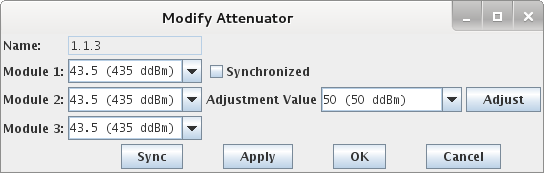
LANforge-GUI Attenuator Configuration Screen
LANforge-GUI 2544 Script with Attenuation
Candela Technologies Inc., 2417 Main Street, Suite 201, P.O. Box 3285,
Ferndale, WA 98248, USA
www.candelatech.com | sales@candelatech.com | +1 360 380 1618
Software Features
Hardware Specification
- RF Attenuator with 0.7Ghz to 6 Ghz.
- Includes 3 ATS0760-95 RF Attenuation modules from EUBUS.
- Controlled by Arduino-Mega micro-controller and custom electronics boards.
- USB-Serial console (115200 8 N 1) for scripting and automated control.
- 2 rotating knobs for manual adjustment.
- LCD Screen for display of current settings.
- High-Quality aluminum chassis with extruded body and 2.4mm thick faceplates.
- Internal RF connectors are highly shielded semi-rigid SMA cables.
- +9v 1AMP external power supply (brick). May also be powered from
500ma USB port.
- Weight: 3 lbs or 1.4 kg.
- Dimensions: 9 x 9.5 x 3 inches Metric: 240 x 230 x 80 mm.
- Operating Temperature: 0 ~ 40°C.
- Operating Humidity: 10 ~ 90%.
- Certification: RoHS.
ATS0760-95 module specifications:
| Impedance: | 50 Ω |
| Frequency Range: | 0.7 GHz – 6.0 GHz |
| Attenuation Range: | 0 – 95.5 dB |
| Attenuation Steps: | 0.5 dB increments |
| Insertion Loss: | 8 dB nominal, 10 dB max |
| Attenuation Accuracy: | 1-15 dB: ±1dB, 16+ dB: ±1.5dB or 4% |
List Price: $5,495
List Price with 1 Year support (17%): $6,429
Additional Products
For a more complete WiFi testing setup, you may wish to consider the
CT711 RF Noise generator,
CT712 RADAR Simulator,
CT523 and
CT525 series WiFi traffic generators.
Candela Technologies Inc., 2417 Main Street, Suite 201, P.O. Box 3285,
Ferndale, WA 98248, USA
www.candelatech.com | sales@candelatech.com | +1 360 380 1618
Last modified: Wed Apr 24 08:24:35 PDT 2019