LANforge-FIRE Stateful Network Traffic Generator
- IPv4/6, TCP, UDP
- iPerf
- Ping, DNS
- IP ToS (QoS) support
- VOIP: SIP/RTP
- HTTP, HTTPS, FTP, Curl
LANforge FIRE Stateful Network Traffic Generator
LANforge FIRE generates and receives various network protocols.
It is used to create load on a network under test. It reports
statistics such as packets sent and received, latency, packet-loss and many
other network characteristics. LANforge supports real protocols
and stateful TCP connections, so it can generate load against web
servers, VOIP gateways, firewalls, load-balancers
and many other network components. LANforge can virtualize network
adapters and wifi station interfaces. It can also act as a router
or group of routers supporting OSPF, RIP, BGP and Multicast (PIM, IGMP).
LANforge supports IPv4 and IPv6.
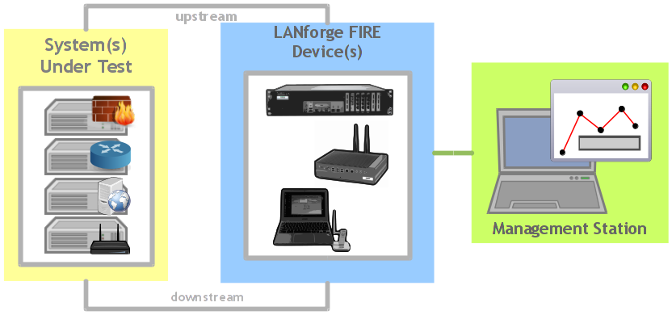
The LANforge system consists of a single manager process, and one or more
traffic generator machines (resources). The resources are connected to the manager over
a management network. Devices under test are connected to
the non-management ports of LANforge systems. If needed, LANforge can also
generate traffic on the management network.
The LANforge GUI may run on the LANforge machines or on the customer's
PCs. The GUI should connect to the manager machine.
Multiple GUIs can be used concurrently.
LANforge FIRE Use Cases
- Validate network equipment for throughput, stability and performance, at up to 10Gbps speeds.
All supported protocols can be used concurrently for a very realistic traffic
mix.
- 24 and 48-port modules especially cost-effective for testing many slower systems,
such as DSL, Cable-Modem, and Satellite modems.
- WiFIRE models can emulate up to 1200 WiFi stations per chassis for testing
access points and other wireless infrastructure.
- VOIP Call generation can be used to load SIP gateways and other VOIP infrastructure.
It can report various statistics, including PESQ quality scores.
- HTTP, HTTPS, FTP and similar load generation can be used to test web servers,
load balancers, and related equipment.
- LANforge can support 50,000+ concurrent stateful TCP connections,
so it can be used to test firewalls, routers, and other equipment that
pays close attention to higher level protocols.
LANforge FIRE Protocols & Connections
- Supports real-world protocols:
(Benchmarked on high-end Candela Technologies-supplied hardware)
- Layer 2: Raw-Ethernet
- PPP: Supports PPPoE interfaces
- Layer 3: Armageddon accellerated UDP/IP (9.99 Gbps+ with 1514 byte frames on 10 GE; 990 Mbps, 81,800 pps on GigE; both symmetrical and bidirectional, sending to self (2 ports)) *
- Layer 3: UDP/IP (6 Gbps+ bi-directional, 3 streams, 24k byte PDUs, 1500 MTU, 10G, to self, some drops)
- Layer 3: UDP/IPv6 (6 Gbps+ bi-directional, 3 streams, 24k byte PDUs, 1500 MTU, 10G, to self, some drops)
- Layer 3: IGMP Multicast UDP (500+ receivers)
- Layer 3: IGMP Multicast UDP over IPv6 (500+ receivers)
- Layer 3: Stateful TCP/IP (9.8Gbps+ on wire, 9.3Gbps goodput, bi-directional with 24K byte writes, 30 streams, 1500 MTU, 10G, to self)
- Layer 3: Stateful TCP/IPv6 (9.8Gbps+ on wire, 9.1Gbps goodput, bi-directional with 24K byte writes, 30 streams, 1500 MTU, 10G, to self)
- Layer 3: Stateful SCTP/IP (850Mbps, bi-directional, 3 streams. No hardware offload exists, CPU bound.)
- Layer 3: Stateful SCTP/IPv6 (850Mbps, bi-directional, 3 streams. No hardware offload exists, CPU bound. Requires global-scope IPv6 addresses.
- Layer 4-7: FTP
- Layer 4-7: SFTP
- Layer 4-7: HTTP (9 Gbps+ download, 65,000+/13,000+ Requests per Second, 6,000+ concurrent connections)
- Layer 4-7: HTTPS (1 Gbps+ download)
- Layer 4-7: SCP
- Layer 4-7: TFTP (1400+ concurrent connections, ~1Gbps throughput)
- Layer 4-7: TELNET
- Layer 4-7: DNS (Used and Reported by most Layer 4-7 traffic types)
- Layer 4-7: PING (via integrated script)
- Layer 4-7: VoIP Call Generator (SIP, RTP, RTCP, PESQ/MOS), 1000+ calls per machine. *
- File-IO: NFS 17+Gbps (dual 10G NICs, mostly reading), 1000+ virtual clients.
- Supports over 50,000 concurrent TCP connections on a single high-end machine with
appropriate licenses. Base license includes 1000 concurrent connections.
Supports around 2000 concurrent Layer 4-7, UDP and other connection types. *
- Supports real-world compliance with ARP protocol.
- Supports ToS (QoS) settings for TCP/IP and UDP/IP connections.
- Utilizes libcurl
for FTP, SFTP, TFTP, SCP, TELNET, HTTP and HTTPS (SSL) protocols.
- Supports file system test endpoints (can be used for NFS, NFSv4, SMB, and iSCSI file systems too!).
Can emulate 1000+ CIFS and/or NFS clients with unique mount points, IPs, MACs, etc *
- Supports custom and command-line programs, like nmap and ping.
- Custom packet builder interface allows hand crafting of headers and payloads. Headers supported at
Layer 2 include ARP, SNAP/LLC, 802.1Q, 802.1QinQ and MPLS. Some Layer 3 protocol headers supported
include IP, IPX, UDP, TCP, ICMP, IGMP, IP-ENCAP, RDP, IPinIP and IPv6 protocols.
- Uses publicly available Linux or Windows networking stack for increased standards compliance.
- Supports 20 or more physical data-generating Ethernet ports per
2U LANforge chassis.
- Emulates over 2000 unique machines with one physical interface with
the MAC-VLAN feature! *
- Supports over 2000 802.1Q VLANs .*
- Supports PPPoE, including automated creation and deletion of
the PPP interfaces
- Supports 802.11a/b/g/n/AC with WiFIRE feature set (see below.)
LANforge FIRE Reporting
- Comprehensive traffic reports include: Packet Transmit rate, Packet Receive rate,
Packet Receive Drop %, Transmit Bytes, Receive Bytes, Latency,
various Ethernet driver level counters, and much more.
- Supports generation of reports that are ready to be imported into your favorite
spread-sheet.
- Allows packet sniffing and network protocol decoding with the integrated
Wireshark protocol sniffer.
Management & Platform Support
- Comprehensive management information detailing all aspects of the LANforge system
including machine statistics, test cases, and Ethernet port statistics.
- The LANforge Management GUI manages the LANforge systems and may be run locally
on the LANforge system or over the network.
- The GUI can manage multiple units, tests, and testers simultaneously.
- The GUI is supported on Linux, Windows, MAC, and other operating systems.
- Supports scriptable command line interface (telnet) which can be used to automate
test scenarios. Perl libraries and example scripts are also provided!
- LANforge testing software supported on Linux and Microsoft Windows.
- Automatic discovery of LANforge systems simplifies maintenance and use of LANforge
test equipment.
- The modular architecture allows you to leverage your existing
LANforge investment as your need for capacity increases.
- LANforge FIRE feature set may be combined
with LANforge ICE to provide background traffic for more realistic testing.
LANforge VoIP/RTP Call Generator Feature Highlights
- SIP protocol used for call management. *
- SIP/UDP supported.
- Can use directed mode, where VoIP phones call directly to
themselves.
- Can also use Gateway mode where the VoIP phones register with a SIP gateway.
- SIP authentication is supported.
- RTP protocol used for streaming media transport, and supports the
following CODECS. More codecs may be supported in the future.
- G.711u: 64kbps data stream, 50 packets per second
- G.729a: 8kbps data stream, 50 packets per second
- Speex: 16kbps data stream, 50
packets per second (Linux ONLY)
- G.726-16: 16kbps data stream, 50 packets per second
- G.726-24: 24kbps data stream, 50 packets per second
- G.726-32: 32kbps data stream, 50 packets per second
- G.726-40: 40kbps data stream, 50 packets per second
- NONE: A messaging-only configuration is now supported
- Supports PESQ automated voice quality testing.
- RTCP protocol used for streaming media statistics
- Each LANforge VoIP/RTP endpoint can play from a wav file and record
to a separate wav file. Almost any sound file can be converted to the
correct wav file format with tools bundled with LANforge. Sample voice
files are included.
- Support for 1000 or more emulated VoIP phones per machine (hardware dependent).
- LANforge VoIP/RTP endpoints can call other LANforge endpoints or third party
SIP phones like Cisco and Grandstream. Third party phones can also call
LANforge endpoints and hear the WAV file being played.
LANforge WiFIRE 802.11a/b/g/n/AC Stateful Traffic Generator
- See some Example WiFi Reports supported by LANforge.
- Useful for testing Wireless Access Points and deployments.
- Can emulate up to 200 802.11a/b/g/n wireless client stations (Virtual STAs) per a/b/g/n radio, and up to 64 per /a/b/g/n/AC radio.
- Each radio can run on only a single frequency at a time. So, all stations on a radio must be
able to connect to an AP on the same channel.
- Each Virtual STA can be associated with a particular Access Point (AP).
- Each Virtual STA can be set to a specific protocol (/a, /b, /g, /n, /AC) or be
told to use the best option available.
- For 802.11n and AC, HT-40 can be disabled.
- For all protocols, the rates can be specified or left auto.
- AMPDU density and factor can be modified for 802.11n stations.
- Each Virtual STA has unique MAC address, IP address and routing table.
- 128bit WEP, WPA, WPA2 (PSK), WPA3 and related wpa_supplicant authentication methods supported.
- Advanced authentication support includes: 802.1x, 802.11u, HotSpot 2.0/HS2.0, EAP-TLS, EAP-TTLS with MSCHAPv2, EAP-SIM, EAP-AKA, etc.
- Automated captive portal login support for Virtual STAs.
- Supported standards include: 802.11r (OTA and over DS), 802.11w, 802.11k, 802.11v
- Supports all LANforge FIRE stateful traffic generation features, including
HTTP, TCP, UDP, TCPv6, UDPv6, VOIP (SIP, RTP) * and more.
- Supports bridge mode where wired Ethernet traffic can connect to the
wired port on the LANforge an have their traffic sent onto the wireless
network. This allows third-party traffic generators to be used. Each
MAC address is associated with a single WiFi station in LANforge. With
release 5.2.2, traffic can be bridged by IP address as well.
- Supports powerful Chamber View scenario-creation to quickly create WiFi testing configurations.
LANforge NetReplay & Backtrack Feature Highlights
- Using a combination of the LANforge FIRE traffic generation and
LANforge ICE network emulation, LANforge supports capture and
replay of Ethernet packet streams.
- Capture protocol can be converted to standard 'libpcap' format for
use with other tools such as Wireshark and tcpdump.
- Capture has been benchmarked at 1Gbps bi-directional
on high-end hardware using 6TB RAID configuration.
Virtual Network Builder
LANforge Netsmith is a drag-and-drop virtual network builder. It can support
virtual routers, emulated network links, bridges (switches), virtual
and physical interfaces, and more. When using routers, it supports
static, OSPF, BGP, Multicast (IGMP, PIM) and other protocols for IPv4 and IPv6.
LANforge FIRE stateful traffic generating
connections and LANforge ICE network emulations are easily placed in
the virtual networks. The virtual routers can connect to external
routers and other network elements for easy integration into your network.
- Emulates networks of arbitrary complexity using real-world routing protocols
by integrating with the XORP router daemon.
- Supports IPv4 and IPv6 static routing.
- Supports IPv4 and IPv6 OSPF routing.
- Supports IPv4 and IPv6 multicast routing.
- Supports basic RIP, OLSR, and BGP routing protocol features.
- Supports Ethernet bridges (switches), including spanning tree protocol (STP).
- The virtual interfaces are 'real', so you can configure them like normal
network interfaces and use sniffers and other tools on the individual
interfaces.
- Virtual router interconnections can be associated with LANforge ICE
network emulations.
- Interfaces can be associated with LANforge FIRE stateful traffic generation
connections.
- See the LANforge FIRE and
LANforge ICE and
cookbook for examples of how Netsmith works.
LANforge FIRE Systems
LANforge FIRE is often customized to a customer's specifications.
In particular all of the LANforge ICE
Network Emulation feature set is available.
Some standard systems are listed below, but please contact
sales@candelatech.com
to discuss your requirements in detail and for a customized quote.
Gigabit in a Box:
CT502-1G |
Simulate up to 250 ethernet devices with unique MAC, IP Address
and routing table over 6 physical ports with gigabit traffic generation.
Excellent for testing routers and firewalls that monitor traffic
flows.
| HTML PDF |
802.11a/b/g/n/AC WiFi:
CT523-328-2ac-1n |
Simulate up to 328 802.11a/b/g/n/AC Wireless Stations in one small
system (200 per /n radio, 64 per /AC radio). Each Virtual Station device has its
own IP address, IP port space, MAC address and routing table.
Excellent for testing Access Points and other WiFi networks.
|
HTML PDF |
VoIP Call Generator:
CT505-30 |
Generate up to 30 concurrent SIP calls with RTP.
Excellent for testing SIP gateways, routers and QoS configurations.
Includes optional PESQ module that provides automated perceptive quality scoring
for the individual calls.
| HTML PDF |
10 Gigabit Generator:
CT503-10G |
Generate and receive 10 Gbps of traffic with a single system.
The CT503-10G is configured with two 10 Gigabit Fiber interfaces.
This system is excellent for testing multi-port high-speed networks.
| HTML PDF |
48-port Last-Mile Traffic Generator:
CT570 |
Generate and receive up to 2 Gbps of traffic across 48 10/100 ethernet
interfaces utilizing a single LANforge machine and a 48-port managed
ethernet switch. This system is
excellent for testing DSL, Cable Modem, and other networks with
a large number of lower-speed network devices.
| HTML PDF |
Candela Technologies Inc., 2417 Main Street, Suite 201, P.O. Box 3285,
Ferndale, WA 98248, USA
www.candelatech.com | sales@candelatech.com | +1 360 380 1618
LANforge-FIRE Related Screen Shots
Layer 3 (Ethernet, UDP, TCP) Connections
Layer 3 Create/Modify Screen
Candela Technologies Inc., 2417 Main Street, Suite 201, P.O. Box 3285,
Ferndale, WA 98248, USA
www.candelatech.com | sales@candelatech.com | +1 360 380 1618
LANforge on Microsoft Windows
LANforge supports Microsoft Windows operating systems,
but Linux is still the preferred platform for advanced features and higher
stability, performance and precision.
Some features currently supported on Windows:
- Layer 2: Raw-Ethernet
- Layer 3: IPv4: UDP, TCP, Custom UDP, Custom TCP
- Layer 3: IPv6: UDP, TCP (XP only, not available on Vista currently)
- Layer 4-7: HTTP, HTTPS (SSL), FTP, VoIP (SIP, RTP), File-IO (CIFS, etc.)
- Display of interface (adapter) related statistics and settings
- Custom packet builder interface allows hand crafting of headers and payloads.
Headers supported at Layer 2 include ARP, SNAP/LLC, 802.1Q, 802.1QinQ and MPLS.
Some Layer 3 protocol headers supported
include IP, IPX, UDP, TCP, ICMP, IGMP, IP-ENCAP, RDP and IPinIP.
- For detailed information on specific features, please contact Candela
Technologies or your sales representative
Some features currently
NOT supported on Windows:
- Layer 3: IPv6 on Vista (Supported on XP)
- Armageddon UDP packet generator
- PPPoE, PPP/T1
- LANforge WiFIRE 802.11a/b/g/n client emulation.
- Virtual interfaces (802.1Q, MAC-VLANs)
- Virtual routers.
- Configuration of interfaces (adapters) through LANforge. You can
configure the interfaces through the normal Windows tools instead.
- For detailed information on specific features, please contact
Candela Technologies or your sales representative.
Additional Feature Upgrades
Unless otherwise noted in the product description, these features usually cost extra:
Candela Technologies Inc., 2417 Main Street, Suite 201, P.O. Box 3285,
Ferndale, WA 98248, USA
www.candelatech.com | sales@candelatech.com | +1 360 380 1618
Last modified: Fri Sep 4 06:14:18 PM PDT 2026